

How to Delete Your Shopee Account in Malaysia
Delete your Shopee Malaysia account in the app. See the steps, what to clear first (ShopeePay, SPayLater, orders) and Vacation Mode for sellers.
You can delete a Shopee Malaysia account in four steps in the app, but Shopee only approves the request once your account is clear. It rejects requests when you have open orders, ShopeePay money, an SPayLater bill or a limited account. Clear those first, then follow the steps below.
What Happens When You Delete a Shopee Malaysia Account
Deletion is permanent. Per Shopee Malaysia’s Help Center, once your account is deleted you can no longer log in or see your order history, chats or account information. There is no undo button and no grace period mentioned.
Two more things to know before you start:
- Shopee approves requests case by case. Your account has to meet every condition on Shopee’s list before the deletion goes through.
- Deleting is not a clean reset. Shopee reserves the right to reject future account sign-ups linked to your personal information. If you are planning to delete and start over, expect friction.
Shopee’s Malaysia help page describes deletion as something you do directly in the Shopee app. It lists no website route, so have your phone ready.
Selling on Shopee? Read the seller section below before you tap anything. A shop with live orders will trip Shopee’s checks, and if all you want is a break, Vacation Mode does the job without burning your account.
Checked against Shopee Malaysia’s Help Center on 26 September 2026. Shopee changes its app often. If a screen looks different, trust the screen and re-check the Help Center article.
What to Clear Before You Request Deletion
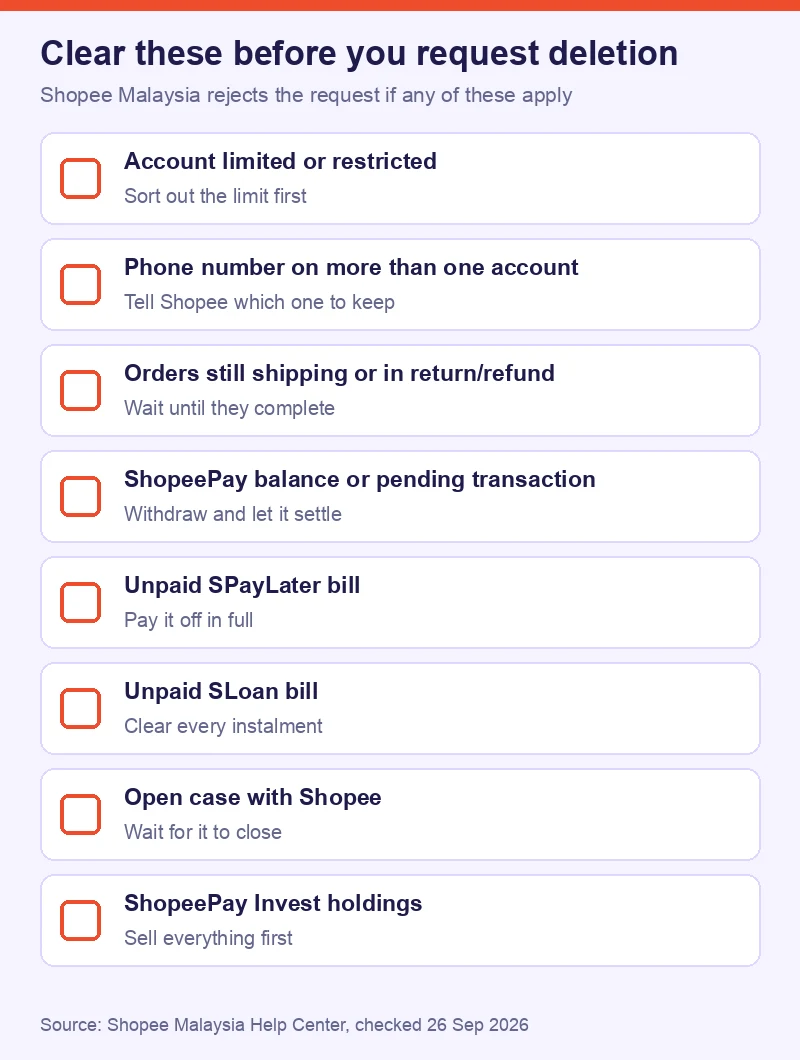
This is where most requests die. Shopee’s Help Center lists eight reasons for rejection. Check every one before you open the app.
| Blocker | What Shopee says | What to do |
|---|---|---|
| Limited or restricted account | Limited accounts cannot be deleted | Read Shopee’s guide on why an account gets limited, fix the cause, then retry |
| Phone number on several accounts | Deletion is blocked | Contact Shopee through the channels at the bottom of its help page and say which account you want to keep |
| Ongoing orders | Orders still being delivered, or in return or refund | Wait until refunds are processed or payments are released to sellers |
| ShopeePay balance or pending transaction | Balance must be zero | Withdraw the balance to your bank and let pending withdrawals or transfers settle |
| Unpaid SPayLater bill | No unpaid bills allowed | Pay the bill in full through the SPayLater section of the app |
| Unpaid SLoan bill | All SLoan bills must be cleared | Pay off the instalments |
| Open case with Shopee | Cannot delete until the case closes | Wait for the case to close, then submit again |
| Active ShopeePay Invest holdings | Holdings must be sold first | Sell everything and confirm the balance is zero (see the ShopeePay Invest FAQ) |
Start with your Orders tab. Orders and refunds take the longest to clear, and you cannot rush them.
Save anything you might need later while you can still log in. That means order receipts, warranty proof and chat screenshots. Shopee says you lose access to all of it after deletion.
How to Delete Your Shopee Account in Malaysia: Step by Step
Do this on your phone, signed in to the account you want gone. Shopee’s main deletion page lists the first four steps. A related Help Center article on phone numbers lists the code, reason and Submit steps that follow. Screens can differ by app version.
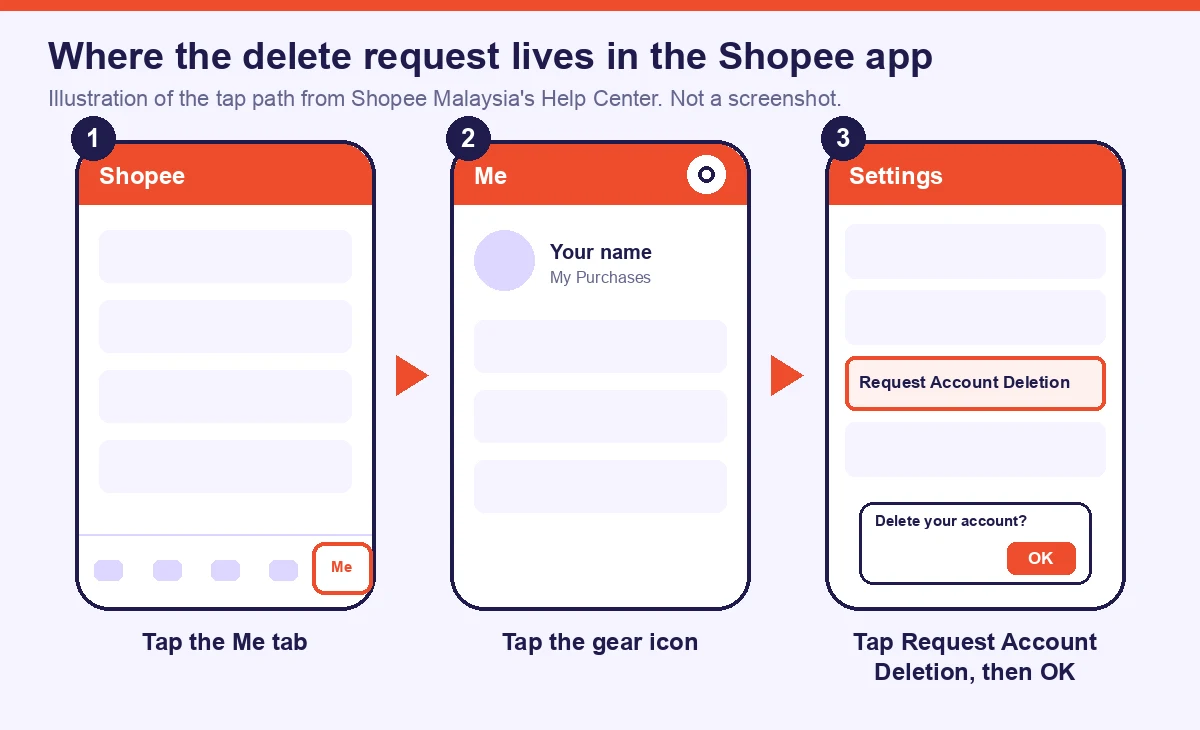
Step 1: Open the Shopee app and confirm the account.
Check you are in the right one. Your username sits at the top of the Me tab, and Shopee has a short guide on finding your Shopee username if you juggle a personal account and a shop account.
Step 2: Tap the Me tab.
It is in the bottom bar of the app. This opens your account page.
Step 3: Tap the Settings gear.
Shopee’s main page calls it Settings. Its phone-number article calls the same gear icon Account Settings.
Step 4: Tap Request Account Deletion, then tap OK.
This starts the request. Read Shopee’s warning screen before you confirm. It repeats that deletion is permanent.
Step 5: Enter the verification code.
Shopee sends a one-time password (OTP) to the phone number on the account. Enter it when asked. Never share this code with anyone else. If that number is no longer in use, you will not receive the code. Shopee’s phone-number help page says to contact Customer Service in that case.
Step 6: Choose a reason and tap Submit.
Pick the reason that fits, then tap Submit. Shopee reviews the request against the list above. Its Help Center does not state how long the review takes.
If Shopee rejects the request, go back to the blocker table, fix whichever condition applies, and submit again.
Sellers: Close Down or Pause the Shop?
If the account you want to delete also runs a shop, deleting it is a bigger move than it looks. Work through this in order.

1. Ship every open order. Open orders block deletion. Shopee’s Seller Education Hub is clear that you must still fulfil orders placed before you pause a shop, and that failing to ship existing orders counts toward your Non-fulfilment Rate.
2. Pull your records first. After deletion you cannot log in or see order history. Download your e-invoices and income records before you submit. Our guide to Shopee e-Invoice for Malaysian sellers shows where both invoice types live, and the Shopee e-invoicing setup guide covers the details Shopee needs from you. Ask your accountant how long you should keep sales records for tax.
3. Empty the wallet. A non-zero ShopeePay balance blocks the request, so withdraw it to your bank.
4. Ask if you really need to delete. If you only want to stop taking orders, use Vacation Mode. Per the Shopee Seller Education Hub, here is what it does:
- All your listings show as “Sold out”.
- Your products stop appearing in recommendations and search.
- Buyers cannot place new orders because Buy Now is disabled.
- You can still add, edit, delist or delete listings.
- It can take up to 1 hour to switch on or off. After you switch it off, you can only switch it on again 3 hours later.
- You cannot enable it while you have ongoing promotions or campaigns.
Go to Seller Centre > Shop Settings > Vacation Mode to switch it on. Shopee’s tip: turn it on at least 3 days ahead so you can clear pending orders, and set an Auto-Reply so buyers know when you are back.
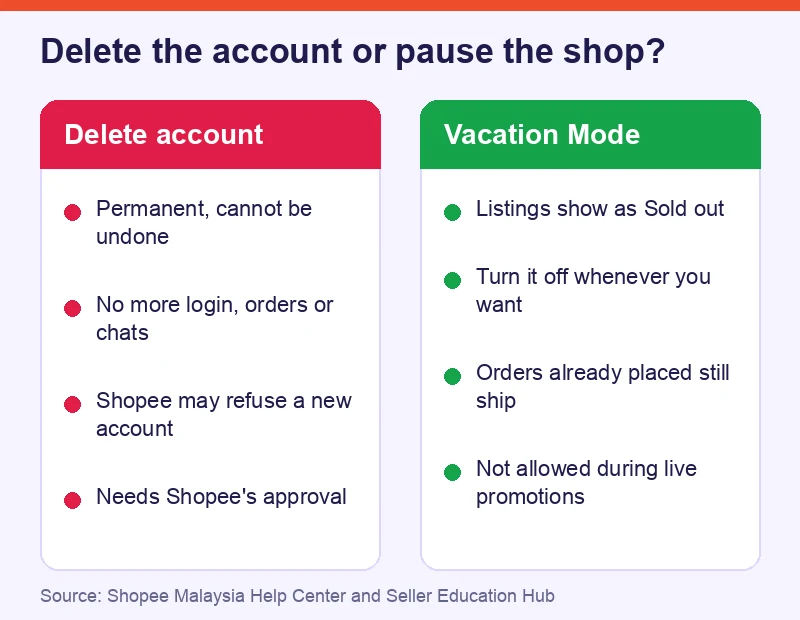
Delete if you are done with Shopee for good and have cleared every blocker. Pause if you might come back, want to keep your listings and order history, or need a break from fulfilment.
If the shop is not earning what you hoped, look at other routes before you cut ties. Our guide to reaching Filipino buyers from a Malaysian store through Shopee SIP is one example.
Frequently Asked Questions
Can I delete my Shopee account from the website?
Shopee Malaysia’s Help Center describes deletion as something you do directly in the Shopee app, and it lists no website route. Open the app, go to Me, tap the Settings gear, then tap Request Account Deletion.
Can I get my Shopee account back after deleting it?
No. Per Shopee Malaysia’s Help Center, deletion is permanent and irreversible. You can no longer log in or see your order history, chats or account information. Shopee may also refuse a new account linked to your personal information.
Why did Shopee reject my account deletion request?
Shopee lists eight reasons: a limited or restricted account, a phone number linked to several accounts, ongoing orders or returns, a ShopeePay balance or pending transaction, an unpaid SPayLater bill, an unpaid SLoan bill, an open case with Shopee, or active ShopeePay Invest holdings. Clear the one that applies, then submit again.
What happens to my ShopeePay balance when I delete my account?
Your ShopeePay balance must be zero before Shopee approves the request. Withdraw the money to your bank account and let any pending transactions settle. If you hold ShopeePay Invest, you also have to sell those holdings first.
My phone number is stuck on an old Shopee account. Do I have to delete it?
Deleting the old account is one option, because it frees the number for your current account. Per Shopee’s phone number help article, the other option is to request a number transfer through its Change Mobile Number webform, which asks you to prove your identity.
Keep Reading
Frequently Asked Questions
Can I delete my Shopee account from the website?
Can I get my Shopee account back after deleting it?
Why did Shopee reject my account deletion request?
What happens to my ShopeePay balance when I delete my account?
My phone number is stuck on an old Shopee account. Do I have to delete it?
Related Articles
Shopee Seller Philippines: A Malaysia Seller's SIP Guide
Want to reach Filipino buyers from your Shopee Malaysia store? Here's how Shopee's SIP program actually works, who gets invited, and what it costs.
How to Set Up Shopee e-Invoicing in Malaysia (2026)
Set up Shopee e-invoicing in Malaysia: get your TIN from MyTax, update Seller Centre, download your fortnightly records. 4 steps for Malaysian sellers.
Shopee e-Invoice Malaysia: Complete Guide for Sellers (2026)
Shopee issues e-invoices to LHDN for Malaysian sellers. Your role: update your TIN, know the two invoice types, and download both for tax records.
Before you go, grab the Shopee setup playbook
Registration, first listing, COD activation, ShopeePay setup. 15 pages, annotated screenshots.
No spam. Unsubscribe anytime.